How We Built an AI Outbound Email System That Improves Itself
A feedback loop between Claude, Slack reviewers, and a versioned prompt repo turned a one-shot outbound email system into one that gets smarter every week — without a single manual training session.

Most AI outbound email systems have a one-way relationship with intelligence. You write a prompt, the AI drafts an email, the email goes out. If it's bad, you tweak the prompt and try again. The learning is manual, intermittent, and entirely dependent on whoever is willing to sit down and do it.
Over the past few weeks, we built something different. Here's how it works and why the most important part isn't the AI at all.
The problem with most AI outbound email systems
The pitch for AI-drafted cold email is compelling on paper: faster personalisation, better relevance, less human time. In practice though, two things go wrong.
First, the AI doesn't know why someone is a prospect right now. It knows they match your ICP. It doesn't know they just spent twelve minutes on your pricing page, or that they submitted their tech stack to see how it compared to yours. Without that signal, personalisation is just pattern-matching against a job title.
Second, even when you fix the prompts and the emails get better, nothing captures that improvement. The next quarter, the next campaign, you start from scratch. The institutional knowledge lives in one person's head or, worse, in a Slack thread that scrolls away.
How our AI outbound email system works
The I/O system (Inbound-Outbound) runs on three signals:
- RB2B, which identifies website visitors by email the moment they land on the site;
- Factors.ai, which enriches each visit with session data — pages viewed, time on site, referrer; and
- An on-site tool that asks visitors for their domain in exchange for a customized demo. Three different entry points, all feeding the same pipeline.
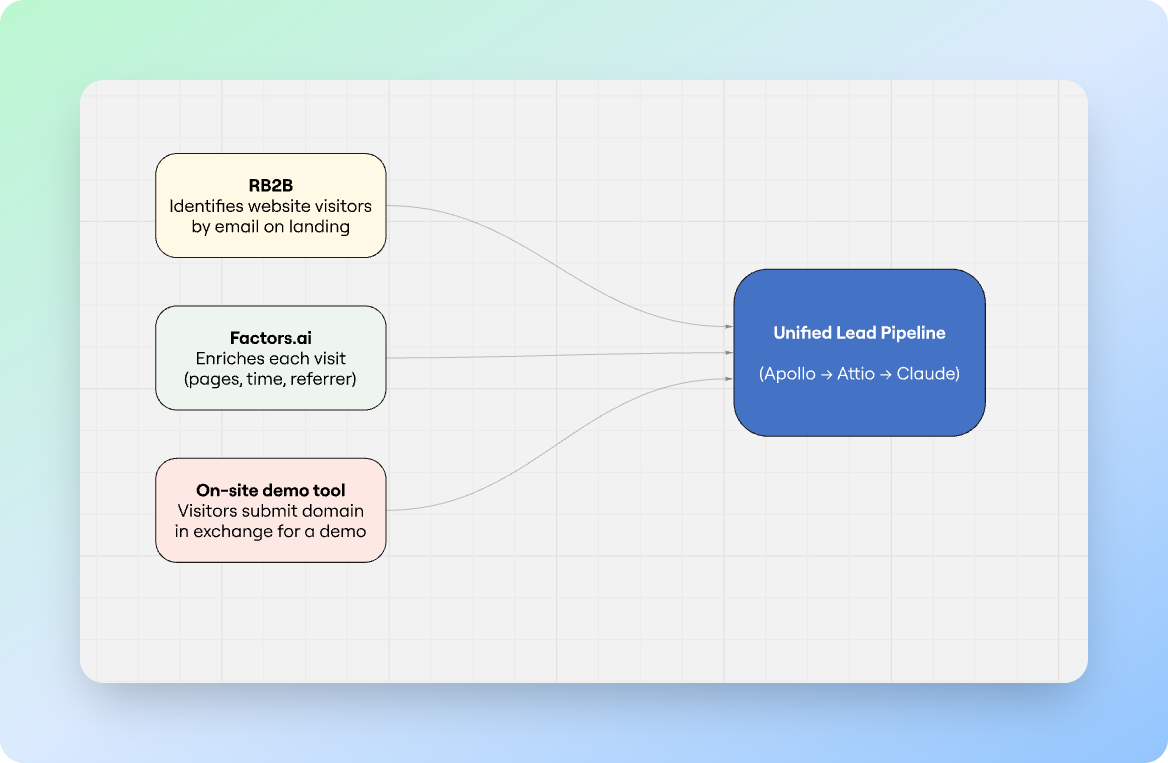
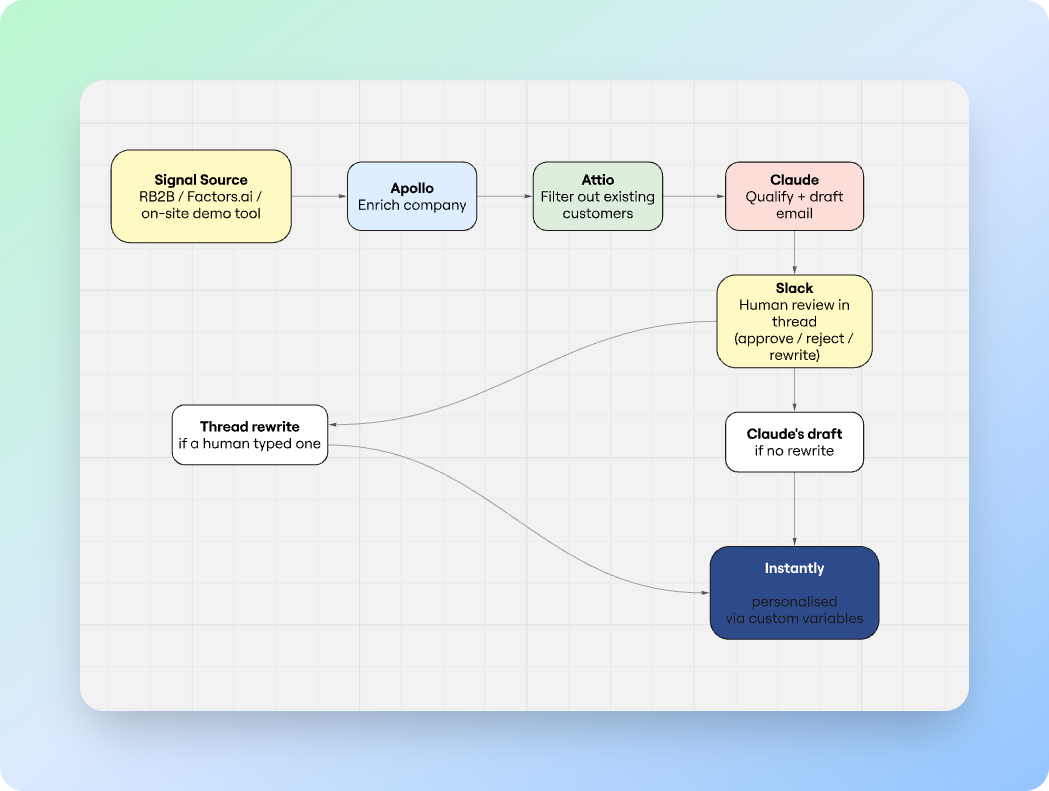
When a signal fires, the workflow runs automatically. It enriches the company via Apollo, checks Attio to filter out existing customers, and then hands the lead to Claude with a specific brief: determine if this is a real prospect, and if so, draft a personalised first email from our CEO.
The brief is precise about what Claude can and can't do. The visited page is used to silently infer intent: if someone reads a comparison post about a competitor, that tells you something.
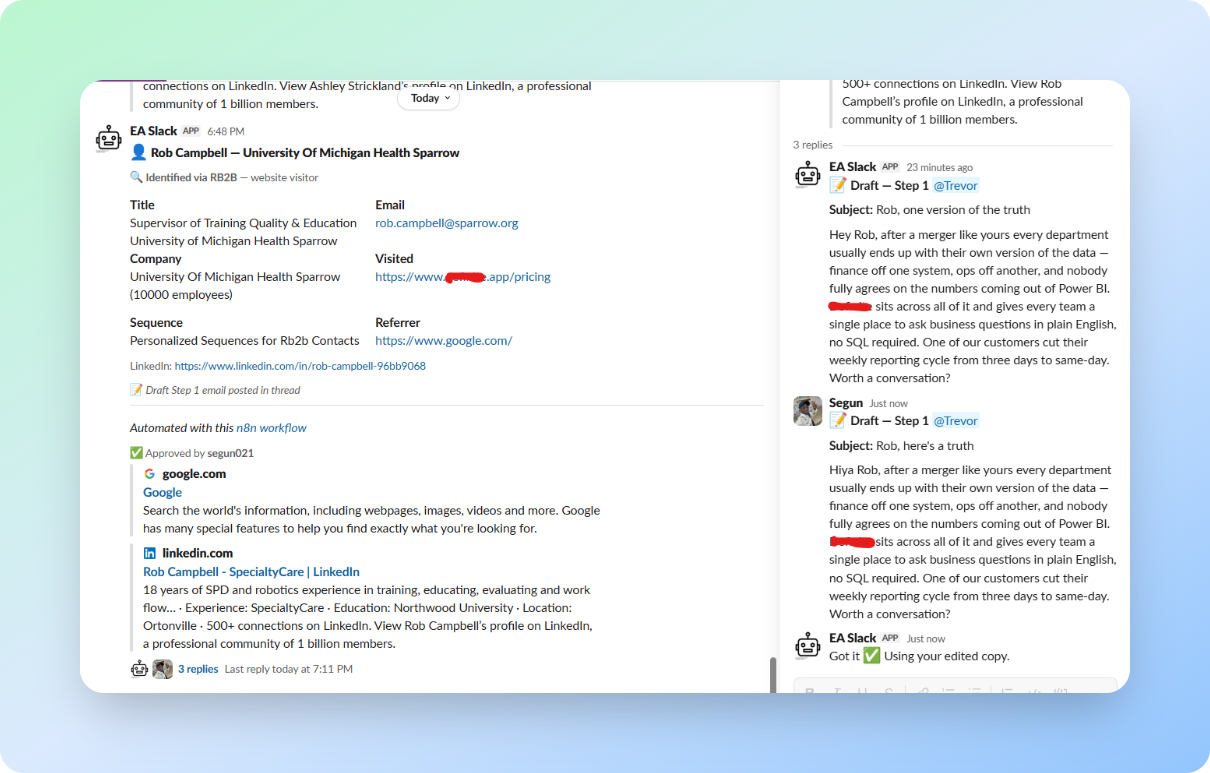
The draft email, along with a full contact card, gets posted to Slack, where a human reviews it. They can approve, reject, or reply in the thread with a rewrite. When they click Enroll, the system reads the thread. If a human wrote something, that version goes to the prospect. If not, Claude's draft does. Either way, the contact lands in Instantly with their personalised email wired in as a custom variable on the sequence template.
How the system learns from human decisions
Every approval, rejection, and human edit is a data point. Most systems throw these away. This one keeps them.
Claude's behaviour is governed by a small set of prompts: qualification criteria, email rules, and sequence allocation logic. They live as Markdown files in a ContextCannon-managed Github repository, fetched by the workflow at runtime. They're not buried in workflow JSON: anyone on the team can open the repo, read exactly what the AI is being told to do, and propose a change in plain English. ContextCannon gives non-engineers a clean editor over the same files, so the prompts are versioned, readable, and editable without touching the pipeline.
The distinction matters. Most teams running AI workflows end up with their prompts trapped inside their automation tool, pasted into an n8n node, an Airtable cell, a Zap config. To change the AI's behaviour, you open the workflow. To review history, you can't. To let a non-engineer suggest an edit, you can't. Pulling the prompts out into a versioned repo turns them from configuration into source code, with everything that implies: diffs, history, review, rollback.
The role of Routines: prompts as source code
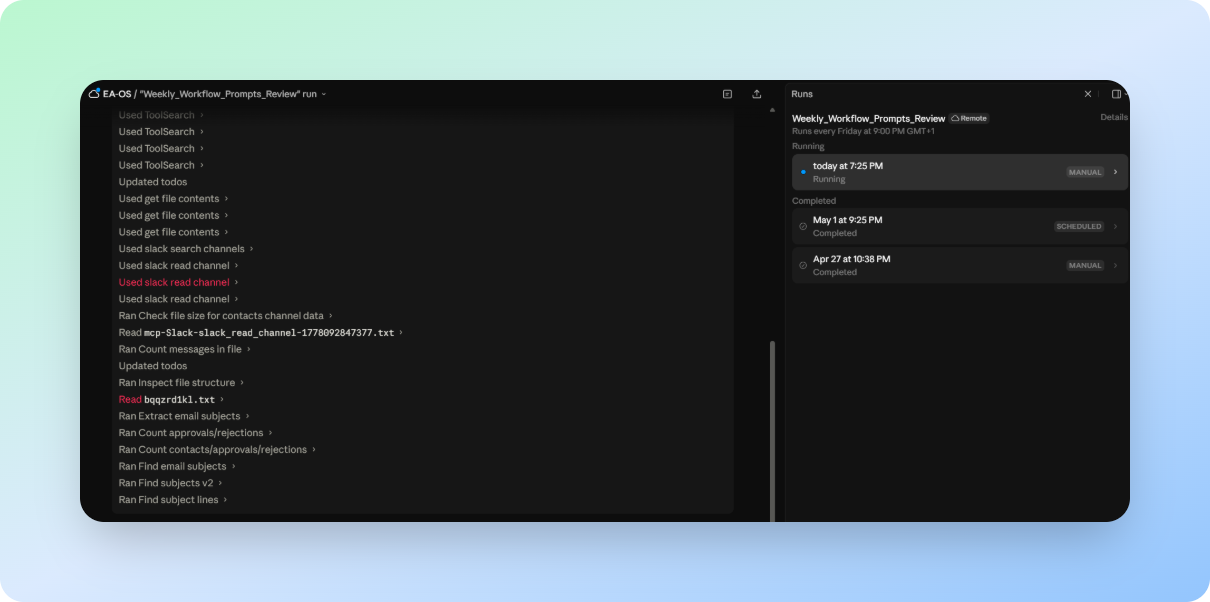
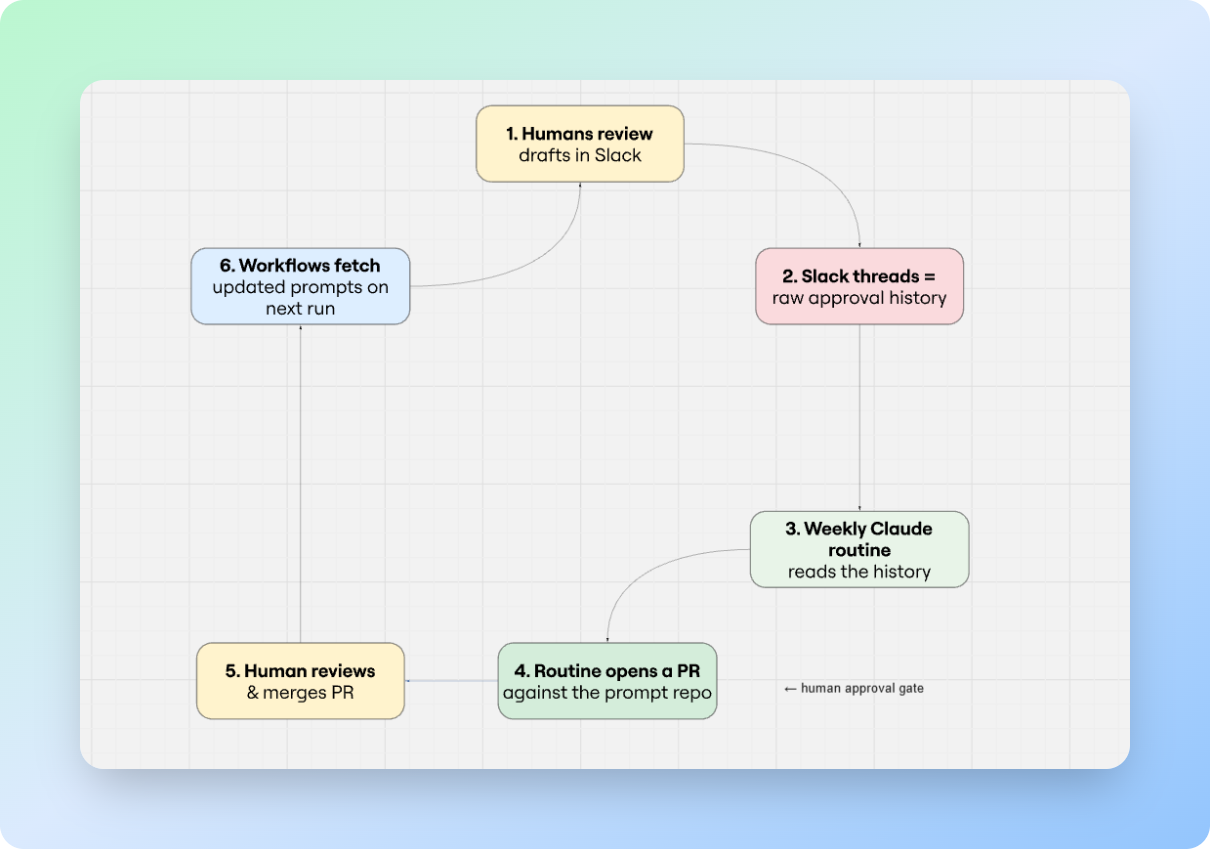
Once a week, a scheduled Claude routine reads the approval history from the Slack channels where decisions were made. It looks for patterns: which company types keep getting rejected, which email angles are being rewritten by humans before they go out, which subject lines are getting opened, which sequences are generating replies. It compares the patterns against the current prompt rules and produces specific suggested edits.
Then, and this is the part that closes the loop, the routine opens a pull request against the prompt repo with those edits. A human reviews the PR the same way they'd review any code change: read the diff, leave comments, request changes, or merge. On the next execution, every workflow in the pipeline fetches the updated instructions automatically. No redeployment, no workflow edits, no downtime.
It's worth dwelling on why this works, because on paper it shouldn't. Slack is, by most engineering instincts, a bad place to store training data. The data is semi-structured at best: free-text replies, emoji reactions, threaded comments, edits that overwrite history. You can't query it like a database. You can't version it. Half the signal is in tone.
That's also exactly why it works. The reviewers were going to be in Slack anyway — the cost of capturing their judgment is zero, because they're already typing it. A reviewer who has to leave their normal flow to log a decision in a structured tool will do it twice and then stop. A reviewer who just replies in the thread the way they always do produces a clean stream of labelled examples without realising it. And because the data is loose and conversational, an LLM can read it directly: "this reviewer rewrote the opener three times last week, and each time made it shorter" is the kind of pattern an LLM is unusually good at picking up, and unusually bad at extracting from a normalised database.
The looseness is also what makes the loop fast to debug. When a recommendation looks wrong, you can scroll back to the exact thread it came from, see the comment that produced it, and fix the prompt directly. In a more "proper" pipeline, that traceability gets buried under schema.
The loop closes, and the system is smarter than it was last week, for the same reason any good team gets better: it paid attention to what worked.
Why the human approval gate is actually training data
The conventional framing of "human-in-the-loop AI" treats the human as a safety check, a gate of sorts, to catch mistakes before they cause damage. That's not wrong, but it undersells what the gate is doing. Every time a reviewer edits an email, they're producing a labelled example: this is better than what the AI wrote. Every rejection is a labelled example too: this prospect doesn't belong in the pipeline. Every approval is a signal too.
The human approval gate is, simultaneously, quality control and a data collection mechanism. You don't have to choose between moving fast and getting smarter. The review process you'd have anyway is also the feedback loop.
The architecture that makes this work is simple enough that it's easy to underestimate: keep the knowledge separate from the infrastructure. When prompts live in your workflow tool, improving them requires a workflow engineer. When they live in a versioned file, anyone who can read and write can improve them, and the system picks up the change on the next run.
At the end of the day, the system that went live four weeks ago is meaningfully better than the one that launched, without anyone sitting down to manually improve it. That… is the point.
We design, build, and operate growth systems for Seed to Series B SaaS. Get in touch if you want to talk through what this looks like for your business.